


Title Tags Explained: Bridging the Gap Between Agency Expertise and Client Understanding
Executive Summary: Key Takeaways on Title Tags
- Title Tags are Foundational: They are a primary on-page signal for Google, the main headline in search results, and the label in browser tabs.
- The 60-Character Limit is a Myth: Google reads the entire title tag for ranking purposes, even if it gets cut off in search results. Truncation is a visual limitation, not a ranking limitation.
- Longer Titles = More Ranking Opportunities: The “invisible” part of the title is prime real estate for secondary keywords and location modifiers, helping you rank for a broader range of queries.
- Google Confirms It: Google representatives have publicly stated that longer title tags have value. Gary Illyes called the length limit an “externally made-up metric” [1], and John Mueller has stated that title length is an “editorial choice, not a hard ranking factor.“
- Focus on Value, Not Just Length: The goal is to be descriptive and provide context, not to stuff keywords. The visible part of the title should still be compelling for users.
1. Why Title Tags Are a Cornerstone of SEO
Before diving into the specifics of title tag length, it is crucial to establish why they are one of the most important on-page SEO elements. A title tag serves three primary functions:
- Your First Impression on Google: The title tag is the clickable blue headline that users see in the search engine results pages (SERPs). It is often the first interaction a potential customer has with your brand and is a major factor in their decision to click.
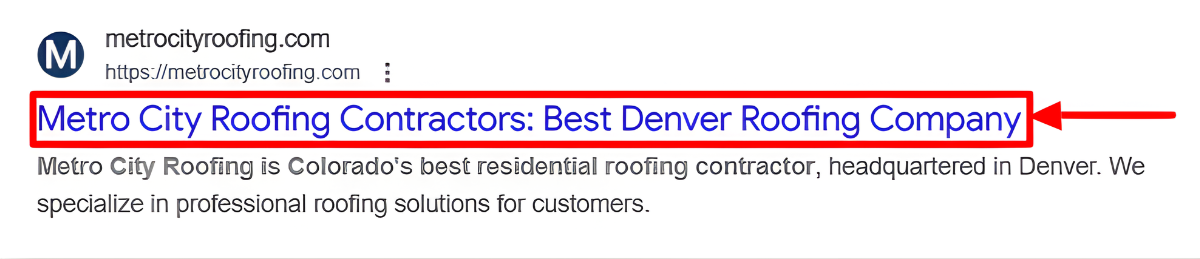
- A Primary Ranking Signal: For search engines, the title tag is a powerful signal that communicates the overall topic of a page. A well-optimized title helps Google accurately match your page to relevant user queries.
- User Experience in the Browser: The title tag appears in the web browser tab, helping users navigate when they have multiple tabs open. A clear and descriptive title enhances the user experience.
Given these critical roles, optimizing title tags is not just a minor tweak — it is a foundational SEO practice.
2. The Challenge: Why Clients Resist Title Tag Changes
Now that we have established their importance, we can address the common friction point that arises when agencies implement optimized title tags, only for clients to request they be changed back. This resistance often stems from a misunderstanding of how title tags function in modern SEO. This guide provides a clear, evidence-based explanation to help bridge that knowledge gap.
3. Debunking the Myth: The Truth About Title Tag Length
The 60-Character “Rule”
For years, a prevailing belief has been that title tags must be kept under 60-70 characters. This guideline originated simply because Google truncates titles visually in search results. Many SEO tools reinforce this by flagging longer titles as errors.
The Critical Distinction: A visual cutoff in search results is not the same as a technical limitation in Google’s ranking algorithm.
What Google Actually Says
The reality is that Google’s algorithm reads and processes the entire title tag, regardless of its display length. This has been confirmed directly by Google representatives.
When asked if there is value in title tags longer than the displayable space, Google’s Gary Illyes gave a simple and direct “Yes” [1]. He called the strict length limit an “externally made-up metric.”
Google’s algorithm “tokenizes” the entire title, meaning every word contributes to the page’s semantic profile and its ability to rank for a wider range of queries.
4. The SEO Advantage: How Longer Title Tags Boost Rankings
More Keywords, More Opportunities
By extending title tags beyond the conventional character count, you create more opportunities for a page to rank. The additional keywords provide Google with more context, increasing visibility for a broader spectrum of searches.
Visual Evidence: A Real-World Example
This is not just a theory; it’s a proven tactic. The graph below, from a case study by Sterling Sky, shows the impact on a page’s average ranking position after implementing a 229-character title tag. The red arrow indicates the point where the longer title was applied, followed by a clear and sustained improvement in rankings [2].

More Case Studies
- The Joel Headley Test: A former Google employee, Joel Headley, ran a test on thousands of healthcare websites. By adding neighborhood names to title tags, he achieved a 15% increase in visibility [3].
- The Personal Injury Lawyer: In a highly competitive niche, a lawyer’s ranking for a crucial keyword jumped from position 6 to 4 after the keyword was added to an already long title, bringing the total to 232 characters [2].
5. Answering the Tough Questions: A Scripting Guide for Client Objections
Here is how to respond when clients ask to “shorten the tags.”
| Client Objection | The Agency Response |
|---|---|
| “My SEO tool (Moz/Ahrefs/Yoast) flags this as an error.” | “Those tools use general guidelines based on display limits, not ranking capability. They are flagging a visual aesthetic, not an SEO performance issue.” |
| “The ‘…’ looks unprofessional and will hurt clicks.” | “Our data from thousands of sites shows no negative CTR impact. The visible part sells the click; the hidden part ensures wider search coverage.” |
| “Isn’t this just keyword stuffing?” | “Not at all. We are strategically expanding titles to include relevant terms and synonyms users actually search for.” |
6. Best Practices for Title Tag Optimization
Use this checklist to craft effective title tags every time.
- Prioritize the Front: Place the most important, user-facing keywords at the beginning of the title tag.
- Be Descriptive: Accurately and succinctly describe the page’s core content.
- Include Branding: Add the brand name at the end, usually separated by a pipe | or hyphen –.
- Embrace the Ellipsis: Don’t be afraid to go beyond the 60-character guideline to provide more context to Google. As SEO expert Joel Headley famously said, “Don’t fear the ellipsis.”
Conclusion: A Strategic Approach to Title Tags
Our mandate as an agency is to improve rankings for your target keywords, drive traffic and leads, not to follow arbitrary guidelines that limit performance. The belief that title tags must be kept under a strict character limit is a relic of the past. By embracing longer, more descriptive title tags, we can rank for our target keywords and even unlock new ranking opportunities for our clients. It is time to move beyond the myth and adopt a more strategic, data-driven approach.
References
[1] Montti, R. (2024, September 20). Google Says There’s No Limit on Title Tag Length. Search Engine Journal. Retrieved from https://www.searchenginejournal.com/google-title-tag-length/400682/
[2] Hawkins, J. (2025, January 27). How Insanely Long Title Tags Help You Rank Better on Google. Sterling Sky. Retrieved from https://www.sterlingsky.ca/how-long-title-tags-help-with-ranking-on-google/
[3] Shaw, D. (2020, September 17). Local Search Summit – Day 2. Whitespark. Retrieved from https://whitespark.ca/blog/wlss-day-2/
Branded Queries Filter: Google’s New Feature Is Out Now
Google just rolled out a new feature in Search Console called the Branded Queries Filter, and it’s actually beneficial! It offers a clear view of how much traffic comes from people who already know your brand vs. people discovering you for the first time.
What is the Branded Queries Filter?
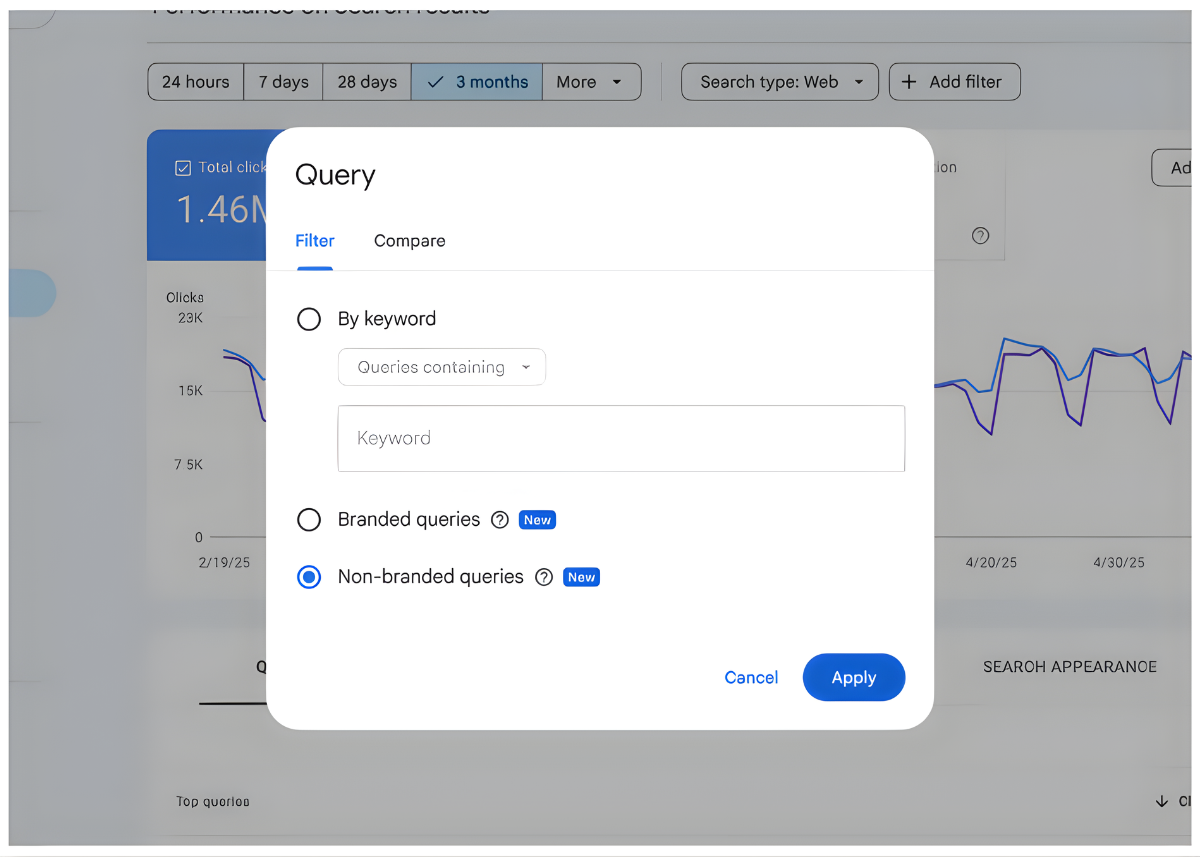
You’ll find this new filter in the Performance report in Google Search Console (GSC).
Google’s AI automatically splits your search queries into two groups:
Branded queries
- Searches that include your brand name, close variations, misspellings, or product names.
- Example: For Google, searches like “Gmail,” “Google,” or “Google Workspace” all count as branded.
Non-branded queries
- More generic searches like “best CRM platform” or “email tool for teams.”
- These people don’t know you yet—they’re just looking for solutions.
Source: Google.com
What is the Best Part?
No more need to write complicated RegEx filters. Google’s AI handles the classification for you, so you get clean, trustworthy segments in seconds.
Why This Update Matters
Separating branded and non-branded traffic isn’t just “nice to have”—it changes how you understand performance.
- Measure real SEO growth
— Non-branded traffic tells you how well your SEO is bringing in new people who weren’t already searching for your name.
— It helps you showcase how much your SEO work contributes to new customer acquisition and growth, instead of just brand searches.
- Track brand awareness
— Branded traffic reflects the impact of everything else you’re doing: ads, social media, PR, podcasts, etc.
— Now you can actually see your brand strengthin the form of clicks and impressions, not just guesses.
- Get more accurate reporting
— Big brand campaigns (TV ads or viral posts) can cause a spike in branded searches that makes “organic traffic” look amazing.
— With this filter, you can separate brand buzz from genuine SEO improvements, making reporting and budget decisions much more
- Build a smart content strategy
— You can see which pages attract cold, non-branded traffic and which ones mainly serve existing fans.
— This helps you double down on the content that turns strangers into leads and customers.
How to Turn On the Filter
Using it is simple:
- Open Google Search Console.
- Go to the Performance
- Click + Add filterat the top.
- Choose Queryas the filter type.
- Select Brandedor Non-Branded.
- Apply the filter and view your data.
You’ll now see Clicks, Impressions, CTR, and Average Position for each segment separately.
Bonus: Search Console Insights now shows a pie chart of branded vs non-branded clicks—perfect for quick stakeholder updates.
Rollouts and Limitations
Google is rolling this out globally for English-language properties, but there are a few things to know:
- Root domains only
- It works for main domains like https://example.com/, not for individual subfolders (e.g. /blog/) or subdomains (e.g. dev.example.com).
- Minimum query volume
- If your site doesn’t have enough branded searches or impressions yet, you might not see the filter. As your brand grows, it should appear.
How to Get the Most Out of the Branded Queries Filter
Here are practical ways to use it:
- Set a non-branded baseline
— Apply the non-branded filter and note your current clicks, impressions, CTR, and position.
— Track this over time to see if your SEO is actually growing or not. If it’s flat, it might be time to adjust your strategy.
- Fix low CTR opportunities
— Look for non-branded queries with high impressions but low CTR.
— These are pages that are being seen but not clicked. Test new titles and meta descriptions to make them more compelling.
- Measure the impact of brand campaigns
— After launching a brand or awareness campaign, switch to the Branded
— If branded clicks jump, you can clearly show how that campaign boosted organic interest in your brand.
- Understand the traffic drops
— If your traffic suddenly falls, the filter helps diagnose the problem:
-
- If non-branded traffic drops, it may be due to an algorithm update or SEO issue.
- If branded traffic drops, it might be a brand or marketing problem instead.
Google Maps Just Redefined Online Reviews — And It’s Bigger Than You Think
Google has rolled out a major identity update for Maps reviewers, and while it may look like a simple cosmetic tweak, it’s actually a meaningful shift in how Google balances privacy, accountability, and community trust.
For the first time, Google Maps no longer requires users to post reviews using their real, full names. Instead, reviewers can now choose a nickname, a handle, or a creative pseudonym—a subtle change with massive implications for local SEO, reputation management, and user behavior across the platform.
Here’s What’s New:
- Pseudonyms Are Now Allowed: Your public Maps name can now be whatever you want, and it extends across your contributor profile.
- Your Google Identity Stays Separate: Your Maps persona no longer has to match your Gmail, YouTube, or Workspace name.
- Your Profile Stays Public: Your photos, badges, and total review count remain visible, even if you’re reviewing as “TacoFan92” instead of your legal name.
So… Is This a Win for Privacy or a Doorway to More Fake Reviews?
That’s where the debate gets interesting.
Google insists it has strong AI and human moderation systems to detect suspicious activity—but opening the door to pseudonyms inevitably creates tension between user safety and review trustworthiness. Local SEOs and business owners, already hypersensitive to every shift in the Maps ecosystem, are paying attention.
Here’s where the conversation stands:
More Fake Reviews Incoming. Anonymity drops friction and accountability, making review manipulation easier for both bad actors and “reputation management” hackers. Higher potential for spam waves, rating volatility, and review takedown spikes.
Better User Protection. People feel safer leaving honest feedback (especially in sensitive categories like health, safety, or employment). More authentic sentiment—if Google’s systems keep the spam out.
Improved Contributor Engagement: Users who hesitate to review publicly may start participating more when their real names aren’t required. Higher review volume, more data… but also more noise.
The Bottom Line
Google’s new nickname policy represents a subtle but fundamental change to one of the web’s most influential review platforms. It expands privacy, invites creativity, and may even deepen user participation… But it also tests the strength of Google’s anti-spam systems at a time when AI-generated content is exploding.
Smart SEOs, business owners, and reputation managers should be watching closely. This update isn’t just about names—it’s about the evolving relationship between trust, identity, and the algorithms shaping local search.
The Arrival of the Shopping Research Assistant in ChatGPT

In ChatGPT, OpenAI has unveiled a new shopping research function that will do product research for you and help you make the best purchasing choices. The action is a direct response to the Gemini 3 shopping features and Google’s AI Mode.
ChatGPT can now act as a personal product researcher, according to OpenAI. To create a personalized buyer’s guide in a matter of minutes, it “asks smart clarifying questions, digs into information across the web, consults reputable sources, and uses what it already knows about you—from previous conversations and your ChatGPT memory.”
For logged-in customers on Free, Go, Plus, and Pro plans, the feature is progressively being released on mobile and the web. According to OpenAI, everyone’s usage will be “nearly” limitless throughout the holiday season.
The experience is demonstrated in a demo video.
In April, OpenAI launched ChatGPT’s shopping search feature. Last month, the Agentic Commerce Protocol was released to automate ChatGPT purchases. Building on such efforts, the new retail research experience expands the shopping capabilities
Just ask ChatGPT a question about the product to give it a try. You can manually choose “shopping research” from the (+) menu, or ChatGPT will prompt you to begin a shopping research session. Following a quick procedure, you will receive a customized recommendation from reliable shops that highlights suggested goods, important distinctions, trade-offs, and up-to-date information. According to OpenAI, the outcome is a succinct, understandable summary that would typically necessitate in-depth comparison and independent reading.
How It Operates
According to OpenAI, a customized version of GPT-5 mini that has been trained using reinforcement learning, especially for retail tasks, powers the feature. In order to produce excellent product reviews, it has been trained to browse reliable websites, reference reliable sources, and integrate information from many sources. Additionally, the system is designed to be interactive, allowing results to be refined in real time depending on your limits, preferences, and input, resulting in final suggestions that seem comprehensive and customized.
Not everyone is cheering, of course. Given that ChatGPT “reviews quality scores,” this development presents issues for affiliate-based websites, as Glenn Gabe pointed out on X.
With ChatGPT, a shopping experience created to manage the research and direct you toward the appropriate products, discover a new way to shop. It allows you to make better-informed purchasing decisions by fusing an interactive interface with the breadth of in-depth research.
ChatGPT learns your tastes when you browse using shopping research. By marking recommended products as “Not interested” or “More like this,” you can influence the results it displays.
Behind the scenes, ChatGPT searches the internet for features, reviews, photos, pricing, and availability. It then presents options when it finds them.
Additionally, it can assist you in locating lookalike products, allowing you to match your favorite style while adhering to your preferred availability, fit, or pricing.
Also, we’re providing almost limitless access to shopping research in ChatGPT across all plans for the duration of the season, to make holiday buying easier. Finding the ideal gifts is another advantage.
The conversation among industry watchers continues on X.
For questions, send me an email here.